

Documentation Index
Fetch the complete documentation index at: https://docs.concretehq.com/llms.txt
Use this file to discover all available pages before exploring further.
May 27, 2026
Introducing Concrete Relay
Chat with Concrete from your phone over SMS. Ask what’s new across your portfolio, check in on a specific company, or jot a note after a founder call, all without opening the app.- A Dedicated Number Per Workspace: Each workspace is assigned its own Concrete number. Save it as a contact (vCard download included) and text it like you would any teammate.
- Ask Anything On the Way to a Meeting: Request the link to a company’s latest pitch deck, pull a founder’s phone number, or grab the most recent ARR and runway figures before you walk into the room. Answers come back as a text with citations that link straight to the source email, file, or meeting inside Concrete.
- Add Notes On the Go: Capture a quick observation after a meeting or call and Concrete will file it against the right company.
- Routines for Daily and Weekly Updates: Tell Relay to text you a Monday morning portfolio digest, a Friday recap of any ARR, runway, or intro requests received that week, or a daily heads-up on any company you’re watching closely. Concrete schedules the routine and delivers it on cadence.
- Members Only: Only verified members of your workspace can chat with your Relay assistant.
Concrete for Solo GPs and Small Teams
A new tier built for solo GPs, small teams (up to 3 seats), and investors who want to try Concrete with their own data before rolling it out more broadly. Sign up, connect your inbox, and start surfacing portfolio intelligence in minutes.- Sign Up and Go: Create your workspace, add your first fund, and sync your inbox in a single guided flow. Concrete starts indexing immediately and backfills a year of historical communication so your portfolio is populated from day one.
- Bring Your Own Stack: Connect Gmail or Outlook, plug in Granola for meetings, and turn on the MCP server for your AI tools, all from Settings.
- Concrete Relay Built In: Text your workspace from your phone the moment setup completes.
- Invite Your Team: Send invites to up to two collaborators directly from the workspace. Larger firms can talk to us about going all-in.
May 12, 2026
Organization-Wide Outlook Sync
Connect an entire Microsoft 365 tenant to Concrete and pull every inbox in the organization into a single unified email feed. This is designed for firms that want full email coverage across the team without requiring each member to connect individually. Setup is split into two steps to accommodate organizations where the Concrete admin and the Microsoft 365 admin are different people: the Concrete admin creates a pending connection and receives a shareable link, which the Microsoft 365 admin opens to review and approve the organization-wide permissions. This feature is available on request — reach out to Concrete to have it enabled for your workspace.May 6, 2026
Mobile-Friendly Citations
The citation viewer and inline source viewers — emails, files, meetings, moments, and notes — have been redesigned for phones and small screens. Open and read citations comfortably from anywhere, so you can stay on top of portfolio activity on the go.May 5, 2026
MCP Server (Early Preview)
Concrete’s MCP server is in early preview — let your AI tools query your portfolio directly. Reach out to your account contact if you’d like access.April 30, 2026
Notes in the Public API
Manage notes programmatically with new endpoints under/api/v1/notes — list, create, read, update, and delete.
- Markdown In and Out: Note bodies use markdown for both request and response payloads, making it straightforward to script note workflows or sync content from external systems.
April 24, 2026
Outlook Inbox Syncing
Outlook is now a supported email source — connect a Microsoft 365 or Outlook.com mailbox from Settings → Connections and Concrete will sync portfolio communications into your timeline.April 23, 2026
Views, Now the Default Experience
Views are now the primary way to browse your portfolio. Both portfolio-level and fund-level pages have been rebuilt around the Views grid, so grouping, sorting, and column controls are available everywhere.- Reworked Portfolio Page: The portfolio overview now uses the Views grid by default — pick the columns and metrics that matter to you and persist them as a saved view.
- Reworked Fund Pages: Fund pages are rebuilt on the same Views foundation, replacing the previous card-and-table layout. Sortable, filterable, and groupable like any other view.
- Default Views, Out of the Box: New workspaces ship with curated default views so there’s something useful to look at on day one.
- Financial Health Score: A new default tracker that distills a company’s overall financial health into a single score, surfaced inline on default views.
- Momentum Score: A new default tracker that captures directional momentum across the business, also surfaced on default views.
- Refined Metric Headers: Cleaner column headers in the metric definition grid make scanning across companies easier.
April 15, 2026
Smart Meeting Sync
The Granola integration now offers two matching modes so you can control how meetings get associated to portfolio companies.- Smart Match: Concrete analyzes meeting content — titles, notes, and transcripts — to identify which portfolio company a meeting is about, even when no participant email matches a known domain. Ideal for ad hoc meetings or when the meeting isn’t synced to your calendar in Granola.
- Strict Match: Only syncs meetings where a participant’s email domain directly matches a portfolio company. A more conservative option for firms that prefer explicit signal over inference.
April 15, 2026
Citation Viewer
Open any source citation in a dedicated viewer to read the full content and context behind an insight — without leaving your current workflow.- Deep Links: Every citation now has a permanent link you can copy and share. Use it to link directly to Concrete source material from external applications, dashboards, and documents.
April 8, 2026
Source Linking on Touchpoint Cards
Citations and sources are now surfaced directly on touchpoint cards — no need to open a full detail view to see what’s behind an insight.- Inline Source Badges: Hover over any touchpoint card to see its sources displayed inline. Emails from the same thread are grouped into a single timeline entry rather than repeated.
March 31, 2026
Granola Integration
Connect Granola directly to Concrete to automatically sync meeting notes into your portfolio workspace — no Zapier required.- Personal or Enterprise API Key: Add a Personal API key to sync notes you own and notes shared directly with you. Add a Granola Enterprise API key to also access your Team Space (Workspace) folders.
- Portfolio-Focused Sync: Only meetings with participants matched to portfolio companies are synced, keeping your workspace focused on what matters.
- Manage from Settings: Connect, pause, resume, or disconnect the integration at any time from Settings → Meetings.
March 27, 2026
Dedicated Notes Tab and Improved Editor
Company pages now have a dedicated Notes tab for managing all the notes you’ve added to Concrete.- Notes Tab on Company Pages: View, create, and manage all notes for a company in one place. The tab displays a live count so you can see at a glance how much context you’ve captured.
- Improved Editor UI: The rich text editor has been polished throughout — cleaner toolbar, better formatting controls, and a more refined note viewing and editing experience.
- Unified Creation Menu: A single
+ Newsplit button lives at the top of every company tab. The primary action is always contextual —New Noteon the Notes tab,New Meetingon the Meetings tab — while the dropdown gives you access to any content type from anywhere.
March 18, 2026
Automated Owner Assignment
Concrete now automatically infers and assigns an owner to each portfolio company based on communication history and member activity — making it possible to surface the right information to the right person, not just firm-wide.- Hyper-Relevant Signal: Knowing who owns what is foundational to delivering individual-level intelligence. Owner assignment is what enables Concrete to route insights, alerts, and updates to the people who need them most.
- Manual Assignments Always Win: Any owner set manually is never overridden by the automated system.
Chat Improvements
- New Retrieval Engine: Significant latency and accuracy improvements, powered by a new hybrid search and retrieval system.
- Richer Responses: Chat now renders a wider range of structured content like styled tables to make complex answers easier to read at a glance.
March 11, 2026
Tracker Search
Trackers now appear in search results, offering fast, at a glance access to metrics and topics across your portfolio.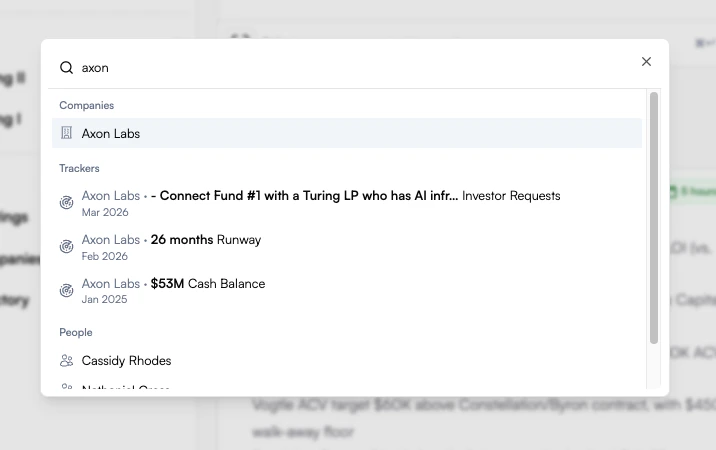
February 23, 2026
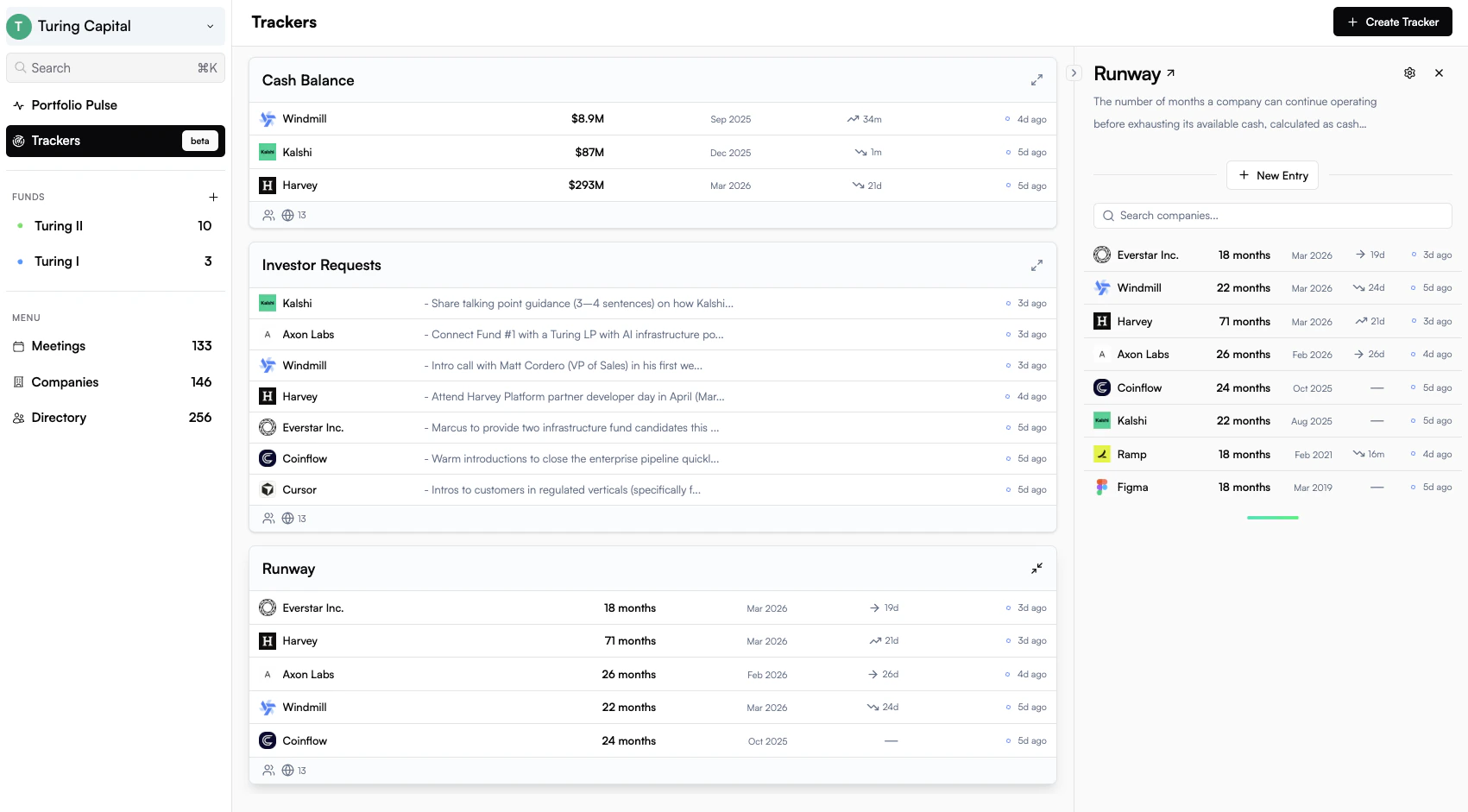
Trackers
Track any metric or topic across your portfolio. Describe what you want to monitor in plain language and Concrete generates the tracker configuration for you. From there, values are automatically surfaced from emails, files, and meeting transcripts as they arrive.- Flexible by Design: Track numbers like ARR or free-form text like investor requests. Go specific with a dedicated ARR tracker or broad with a general revenue tracker. The right level of detail is up to you.
- AI Extraction with Citations: Every suggested value links directly back to the source — the exact email, file, or meeting it came from, and the passage the AI used to identify it.
- Full Audit Trail: Values are marked as suggested, approved, submitted, or rejected so your team always knows what’s been verified and what’s still pending review.
- Scope and Visibility Controls: Apply a tracker across your entire portfolio or a targeted subset. Keep it private or share it with your team.
- Gets Smarter Over Time: Rejecting an incorrect value isn’t just cleanup — it feeds back into the extraction agent, improving accuracy for future runs.
- Instant Historical Backfill: The moment you publish, Concrete scans all existing content and populates historical values automatically.
- Ready Out of the Box: New workspaces come with popular trackers like Cash Balance, Runway, and Investor Requests already configured.
December 19, 2025
Team Management
- Member Suspension: Preserve institutional knowledge when team members depart. Suspend members to remove workspace access while keeping all their contributions—emails, notes, and touchpoints—intact in your portfolio timeline. Easily reinstate suspended members if they return.
Chat Improvements
- Redesigned Source Display: Chat sources now appear in a streamlined horizontal list with intelligent labeling.
December 15, 2025
Portfolio Reviews
Run portfolio reviews in Concrete with our new company rating system. Assign internal ratings alongside your company data, emails, meetings, and insights.- Investor Commentary: Add context to every rating with commentary, capturing the reasoning behind each assessment.
- Ratings Timeline: Track how company ratings evolve over time with a visual history, making it easy to spot trends and inflection points.
- Fund Dashboard: View and assign ratings directly from fund pages with sortable tables and sparklines that show rating trajectories at a glance.
- Fund-Level Granularity: Ratings are scoped by fund, so you can track the same company differently across multiple vehicles.
December 4, 2025
Citation Enhancements
- Gmail and Superhuman Deep Linking: Added deep linking to both Gmail and Superhuman to the in-app email viewer. Wherever emails are shown in Concrete (citations, company pages, touchpoints) you can now seamlessly jump to your preferred email client.
November 25, 2025
Direct Upload File Integration
- Files Now Generate Touchpoints: Files you manually upload to Concrete now automatically create touchpoints on your portfolio timeline. Share a board deck or investor update directly with Concrete, and it flows into the same unified timeline as your meetings and emails—no inbox forwarding required.
- Smart Date Detection: Uploaded files are intelligently analyzed to extract the relevant date from their content, ensuring they appear in the correct chronological context on your timeline.
- Editable File Metadata: Easily update file categories and occurrence dates directly from the files table for precise organization.
Performance Enhancements
- Faster Page Loads: Significant speed improvements make navigating your portfolio, filtering feeds, and loading company pages noticeably snappier.
November 18, 2025
Enhanced Fund Views
- Visual Activity Timeline: New dot-grid timeline visualization on fund pages shows portfolio company activity at a glance, making it easy to spot patterns and track momentum across your portfolio.
- Insight Integration: Access categorized insights directly from fund views, helping you quickly understand what’s happening across your companies.
November 14, 2025
Introducing Portfolio Insights
- Smart Activity Feed: Concrete now automatically surfaces key developments from across your portfolio in a unified insights feed.
- Intelligent Categorization: Filter by insight type to focus on what matters most—track growth metrics, product launches, funding rounds, team changes, and more.
- Performance & Capital: Growth, Financial Health, Funding, Exit updates
- Execution: Product, Go to Market, Marketing developments
- Organizational Health: Team, Operations, Governance changes
- Linked Citations: Every insight includes direct citations to source materials like emails, meetings, and files, so you can dive deeper with one click.
Performance Enhancements
- Faster Filtering: Significant performance improvements to filtering across feeds and company pages with optimized queries and smoother interactions.
- Enhanced AI Intelligence: Improved accuracy in identifying and categorizing email invitations and communications with upgraded AI models.
- Smarter Content Processing: Image attachments now filter out low-value images, focusing indexing on meaningful visual content.
November 7, 2025
Integration Expansion
- Zapier Integration: Connect Concrete with AI notetaking apps like Granola to automatically send meeting transcripts and notes into your portfolio workspace. Enables seamless workflows with thousands of compatible apps.
October 24, 2025
Data Synchronization
- Automatic Domain Tracking: Portfolio company domains are now continuously monitored for redirects.
- Ensures seamless content syncing for emails and other domain-based integrations.
- Companies that rebrand or change domains will see improved coverage without the need for manual updates.
October 20, 2025
Platform Enhancements
- Customizable Fund Organization: Drag-and-drop reordering for funds in the navigation sidebar, allowing teams to prioritize their portfolio view.
October 17, 2025
File Viewer System
- In-App File Viewing: Limit context switching with the ability to seamlessly view PDFs, screenshots and other files inside Concrete.
- Citation Navigation: Page-level navigation immediately jumps to the relevant content for a citation.
- Platform Integration: Integrated across the platform in places like company file folders, chat, and citations.
October 12, 2025
Chat Experience Improvements
- Redesigned Chat Interface: Streamlined chat UI with improved navigation and interaction patterns.
AI Model Updates
- Latest Model Support: Upgraded to latest models for enhanced reasoning capabilities across the platform.
Performance Optimizations
- Database Query Optimization: Significant database query optimizations with improved indexes and views for faster data retrieval across files, meetings, and company pages.
October 3, 2025
Chat Intelligence Improvements
- Enhanced Speed and Accuracy: Major architectural improvements including streaming responses, improved citation logic, and smarter model selection for faster, more relevant answers.
September 19, 2025
Email Crawling Improvements
- Custom Screenshot Engine: Screenshots from crawled links in emails use a dedicated full-page screenshot service. Basic viewport capture is replacaed with comprehensive traversal. The complete content is now better captured on websites with complex layouts.
- Linked Content Filtering: Indexing isolates primary page content from navigation elements, ads, and secondary UI components, improving indexing accuracy.
September 3, 2025
Tagging Context
- Company tags on meetings now include context snippets. Hover over meeting company tags throughout the platform to view tooltips describing the context of the mention.
September 2, 2025
Meeting Enhancements
- Improved Tagging: Improved tagging intelligence to reduce noise from irrelevant company/person mentions.
- Advanced Filtering: New filters on company and person meetings pages. Users may toggle whether to show meetings where the person/company was mentioned or limit to those where the person/company attended (default).
August 28, 2025
Email Enhancements
- Capturing Newsletters: Added public-oriented newsletters to captured portfolio company communications. Newsletter content was previously ignored.
August 26, 2025
The Concrete Docs site is live! Use this page to track changes and updates to the Concrete platform.- Meeting Intelligence: New meeting intelligence features including intelligent participant tagging, meeting categorization and grouping with contextually similar content like emails and files.
- Public API: Public API is now live. Use our API to automate common workflows like meeting logging and portfolio company syncing.